
cd2tex / cddb2tex / cddblist
----------------------------

Cd2tex creates a cd-front/back-cover with the contents of a cd in latex-
format, cddb2tex does the same with a cddb-file as source. The tcl/tk-
frontends also allow output in postscript-format, direct printing or using
a viewer like gv to show the cover.
Cddblist produces a list with all albums in a cddb-directory, the graphical
frontend can start cddb2tex with a selected cd from this list as parameter.
Usage:
------

cd2tex [directory] [disctitle] [left-text] [right-text] [fontsize (1-8,
       normal: 3)] [maxdepth] [mp3 (1/0)] [size of title (1-8, normal: 6,
       no (std/front-cover): 0 ] [title-rotation (1/0)]

directory:      mountpoint of the cd (/cdrom)
disctitle:      title of the cd
left-text:      text printed at the left bottom
right-text:     text printed at the right bottom
fontsize:       fontsize used for the disc-entries (3)
maxdepth:       recursion depth for subdirectories (255)
mp3:            omit ".mp3"-extensions (1)
size of title:  fontsize used at the left/right edge of the cd-cover
                0: no=print front-cover, normal: 3 (0)
title rotation: rotate characters of the side-text by 90 degrees (1)

The output is sent to stdout (use ">file" to write it into "file").
Blanks in disctitle, left-text and right-text should be replaced by "_".


cddb2tex filename [left-text] [right-text] [size of title (1-8, normal:
         6, no (front-cover): 0)] [title-rotation (1/0)]

filename:       cddb-file (http://www.freedb.org)
left-text:      text printed at the left bottom
right-text:     text printed at the right bottom
size of title:  fontsize used at the left/right edge of the cd-cover
                0: no=print front-cover, normal: 3 (0)
title rotation: rotate characters of the side-text by 90 degrees (1)

The output is sent to stdout (use ">file" to write it into "file").
Blanks in disctitle, left-text and right-text should be replaced by "_".


cddblist [directory] [format: tyin (title, year, discid, filename )]
         [titlelength]

directory:      directory with cddb-files (~/.cddb)
format:         information included in list, can be a any combination
                of t(disctitle), y(year), i(discid), n(filename of cddb-
                file)
titlelength:    max. length of the disctitle

The output is sent to stdout (use ">file" to write it into "file").


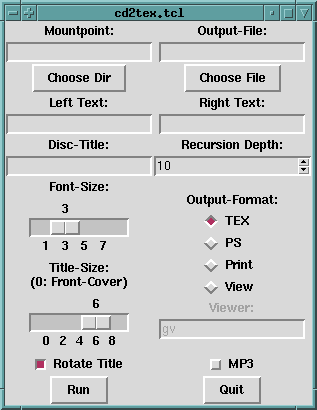
cd2tex.tcl [directory] [output-file] [disctitle] [left-text] [right-text]

Graphical frontend for cd2tex. Needs tcl/tk to be installed.


cddb2tex.tcl [filename] [output-file] [left-text] [right-text]

Graphical frontend for cddb2tex. Needs tcl/tk to be installed.


cddblist.tcl [directory]

Graphical frontend for cddblist, which can start cddb2tex.tcl with a
selected cd as parameter. Needs tcl/tk to be installed.


Installation:
-------------

1.)Extract the archive with "tar xvzf cd2tex-0.4.tgz".
2.)Change into the created directory with "cd cd2tex-0.4".
3.)If you don't want to use the precompiled binaries for linux_x86, compile
   the source files with "./compile.sh" (you will need freepascal
   (http://www.freepascal.org) for this).
4.)Install with "sudo ./install.sh" to "/usr/local/bin" or
   "sudo ./install.sh dir" to "dir".


Download:
---------

cd2tex-0.4.tgz:        source and precompiled binaries for linux_x86
cd2tex-0.4-1.i386.rpm: RPM for linux_x86
Thomas Klein - 16.10.2007